
How to use IQOS Iluma Standard

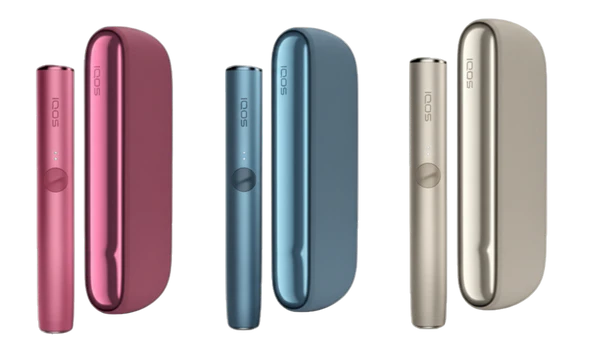
IQOS ILUMA Standard is part of the latest generation of heated tobacco devices developed by Philip Morris International. Unlike traditional cigarettes, it uses a heat-not-burn system to deliver nicotine by heating tobacco instead of burning it. This results in a cleaner experience with no ash, less odor, and a more controlled flavor.
What makes the ILUMA series stand out is its bladeless Smartcore Induction System™, which simplifies usage and reduces maintenance. If you’re new to IQOS or switching from older models, this guide will walk you through everything you need to know—step by step—so you can use it properly and get the best experience.
Understanding the Device
Before using the device, it helps to understand its main components:
1. Holder
This is the part you hold during use. It contains the heating system and is where you insert the tobacco stick.
2. Pocket Charger
The holder is stored and charged inside the pocket charger. It keeps your device powered throughout the day.
3. TEREA Sticks
The ILUMA Standard is designed exclusively for IQOS TEREA sticks. These are specially sealed tobacco sticks made for induction heating.
First-Time Setup
When you first get your IQOS ILUMA Standard, follow these steps:
Step 1: Charge the Device
- Remove all components from the box
- Connect the pocket charger to a power source using the provided cable
- Let it charge fully (this usually takes around 2 hours)
A full charge ensures optimal performance and multiple uses throughout the day.
Step 2: Turn On the Device
- Press and hold the button on the pocket charger for about 4 seconds
- LED lights will turn on, indicating the battery level
Once powered on, your device is ready for use.
How to Use IQOS ILUMA Standard
Step 1: Prepare the Holder
- Remove the holder from the pocket charger
- Ensure it has enough battery (check LED indicator)
Step 2: Insert the TEREA Stick
- Take a IQOS TEREA stick
- Gently insert it into the holder
- Do not twist or force it—the stick is designed to fit smoothly
The sealed design prevents tobacco residue, making it cleaner than older models.
Step 3: Start Heating
- Press and hold the holder button for about 1 second
- The device will vibrate and the LED light will pulse
This indicates the heating process has started.
Heating time: حوالي 20 seconds (approx.)
Step 4: Begin Your Session
- Once ready, the device vibrates again
- The LED light becomes solid
You can now start taking puffs.
Session duration:
- Around 6 minutes OR
- Approximately 14 puffs
Step 5: End of Session
- The device will vibrate when you have about 30 seconds or 2 puffs left
- After the session ends, it will automatically stop heating
Step 6: Remove the Used Stick
- Pull out the used TEREA stick
- Dispose of it properly
Unlike older IQOS versions, you don’t need to clean leftover tobacco from inside.
Step 7: Recharge the Holder
- Place the holder back into the pocket charger
- It will automatically start charging
Charging time for the holder is usually a few minutes, allowing you to use it again quickly.
Daily Usage Tips
1. Keep It Charged
Always ensure your pocket charger has enough battery. A full charge can typically support multiple sessions throughout the day.
2. Use Only Compatible Sticks
The ILUMA Standard works only with:
- IQOS TEREA sticks
Using other types may damage the device or not work at all.
3. Avoid Forcing the Stick
If the stick doesn’t insert easily, don’t push hard. This could damage the internal system.
4. Store Properly
- Keep your device in a cool, dry place
- Avoid exposure to water or extreme heat
Cleaning and Maintenance
One of the biggest advantages of the ILUMA Standard is that it requires minimal cleaning.
Why Less Cleaning Is Needed
- No blade inside the holder
- Sealed TEREA sticks prevent tobacco residue
Basic Maintenance Tips
- Wipe the exterior with a dry cloth
- Keep the charging port clean
- Avoid inserting anything into the holder
Unlike previous IQOS models, you don’t need regular deep cleaning.
Charging Guide
Charging the Pocket Charger
- Connect to a power source using the cable
- LED indicators show battery status
Charging the Holder
- Insert it into the pocket charger
- It charges automatically
Understanding LED Indicators
The LED lights help you understand your device status:
- Solid light: Ready to use
- Pulsing light: Heating in progress
- Blinking light: Low battery or error
- No light: Device is off or fully discharged
Common Mistakes to Avoid
1. Using Incorrect Sticks
Only use IQOS TEREA sticks. Other sticks are not compatible.
2. Removing the Stick Too Early
Wait until the session ends to remove the stick for best performance.
3. Ignoring Battery Levels
Low battery can interrupt your session.
4. Dropping the Device
Although durable, internal components can be damaged by impact.
Advantages of IQOS ILUMA Standard
1. Cleaner Experience
- No ash
- Less smell
- No tobacco residue inside the holder
2. Easy to Use
- Simple button operation
- Quick heating time
- Automatic session control
3. Advanced Technology
- Smartcore induction heating
- Consistent flavor delivery
- Improved reliability
4. Low Maintenance
- No blade cleaning required
- Minimal upkeep
Safety Tips
- Keep away from children
- Do not expose to water
- Use only official charging accessories
- Do not attempt to open or repair the device yourself
Who Should Use It?
The IQOS ILUMA Standard is designed for:
- Adult smokers looking for alternatives to cigarettes
- Users who prefer a cleaner and more modern tobacco experience
It is not intended for non-smokers or minors.
Final Thoughts
The IQOS ILUMA Standard offers a straightforward and user-friendly way to enjoy heated tobacco. With its bladeless design, minimal maintenance, and consistent performance, it represents a significant upgrade from earlier IQOS models.
By following the steps in this guide—charging properly, inserting TEREA sticks correctly, and maintaining the device—you can ensure a smooth and satisfying experience every time.